
Bills of Material the foundation
Helping you configure to order
Engineering-based Configurator Model Design, Architecture and Programming
Introduction Bills of Material What goes in Option Classes Summary
Introduction
Designing Configurator model Bills of Material is critical to the success of a Configure-to-Order Oracle implementation.
You need to consider:
- Model type.
- Model content – required and optional items.
- Model structure.
- Rules.
- Your manufacturing process.
This section will discuss:
- Model types.
- Model content.
- Model structure.
Oracle Configurator model Bills of Material
Configurator models in Oracle can be thought of as “intelligent” Bills of Material. Configurator models include:
- A Bill of Material containing required and optional items.
- Rules for selecting correct and compatible combinations of items.
- A User Interface.
Oracle has two types of Configurator model Bills of Material:
- Assemble-to-Order (ATO).
- Pick-to-Order (PTO).
Use an ATO model whenever you need to generate a work order that will progress through your manufacturing line. Use a PTO model whenever you need to generate a pick list that can be fulfilled from inventory.
What goes into a Configurator model BOM
Configurator models should contain all the items that might ever be used in any combination. This will usually include both required and optional items.
In the illustration below, all possible electronics housings, process connections, manuals, safety tags, etc. have been included in an ATO model Bill of Material (BOM).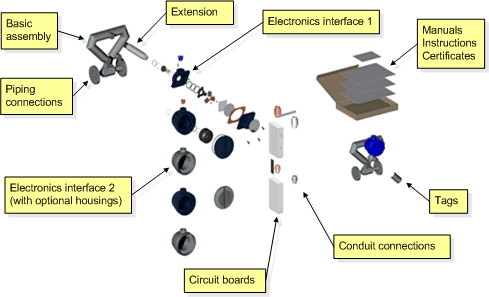
Figure 1: Oracle Configurator model BOMs include both required and optional items
Obviously, specific configurations do not require all items. The Configurator is used to select the optional items used in individual configurations.
This is done by interacting with a custom User Interface that in turn drives rules. The rules select items from the ATO or PTO model BOM. A sample User Interface is shown below.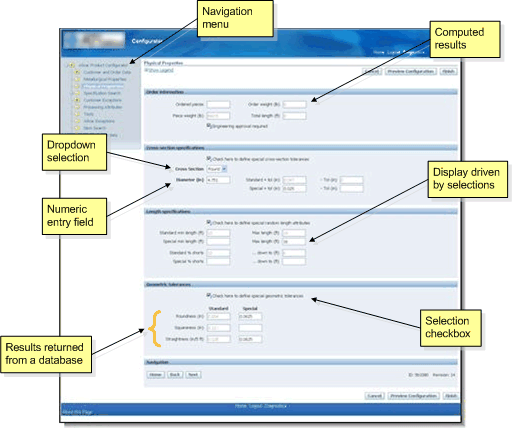
Figure 2: A sample Oracle Configurator User Interface
Oracle Configurator Option classes
The Configurator does not place any limitations on model structure. You may create as many levels in your BOM as necessary to define your product. You may include both required and optional items at any level.
In addition, you have complete freedom to define lower-level Phantom and Subassembly item types just as you would in a non-configurable BOM.
In some cases, it may be desirable to collect a set of similar components into an Option Class. An Option Class behaves exactly like a Phantom BOM – except that you may include optional items.
For example, you might create an Option Class to contain a group of manuals that are written in different languages and another to contain safety tags for different countries. You might then have a “Country” selection in your User Interface that would drive a rule to select the correct optional manual and safety tag.
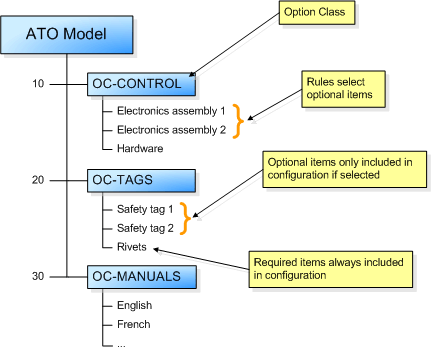
Figure 3: An ATO model BOM with Option Classes
Summary
- Models in Oracle can be thought of as “intelligent” Bills of Material.
- There are two types of models in Oracle: ATO and PTO.
- Include every item that might be needed in every possible configuration in your model.
- Use the User Interface and rules to select the optional items needed for a specific configuration.
- Structure models with as much complexity as you need to describe your product.
- Use Option Classes to contain similar optional items if needed.
- Option Classes may also contain required items!
Please contact Aeolus Solutions today to see how we can help you speed up your order entry process with configurable Bills of Material!